
Black Friday Google Ads work is mostly done by early November. Audit tracking and the feed in October, load sale prices and promotions with explicit timezones, write sale copy, then freeze structure. From 26 to 30 November, scope any seasonality adjustment to those five days, raise budgets in steps, and step down from 1 December.
The 2026 dates are fixed: Thanksgiving is Thursday 26 November, Black Friday is Friday 27 November and Cyber Monday is Monday 30 November 2026. Every deadline below is counted back from them, and every Google rule quoted below links to the Help page it comes from, so you can check the rule before you touch the account.
What changes in Google Ads for Black Friday?
Three things change, and account structure is not one of them. Conversion rates usually jump for a few days, prices change in the feed and on the site, and the ads have to carry the offer. The campaigns, the conversion tracking and the way products are grouped should look the same on 27 November as they did on 9 November.
The demand is large and it is packed into a handful of days. Cyber Week 2025, Thanksgiving through Cyber Monday, brought $44.2 billion of US online spend, up 7.7% (Adobe, 2 December 2025). For the 2026 season, Deloitte forecasts holiday ecommerce sales of $316.1 billion to $318.9 billion between November 2026 and January 2027, up 7.5% to 8.4% (Deloitte, 10 September 2026). A forecast is not a promise, but neither source points to a quiet November.
Google is also where many holiday shoppers go looking for ideas. In Ipsos research for Think with Google, 85% of US holiday shoppers using Google and YouTube said these tools help them find inspiration and discover or expand ideas (Think with Google, August 2026). That is the case for having Search and Shopping live and healthy through October and early November. People research before the discount opens, and a campaign that only switches on for the sale meets them at the end of the decision rather than the start.
What does change is a short list of settings: the conversion rate signal Smart Bidding receives, the sale price and its dates in Merchant Center, the promotions attached to products, the Search assets that state the offer, and the budget ceilings. Most of them have an official rule. The expensive errors tend to come from getting one of those rules slightly wrong, and it is usually a date, a timezone or a scope rather than a strategy.
| Setting | Where it lives | What to set for 2026 | Common mistake |
|---|---|---|---|
| Seasonality adjustment | Google Ads, bidding settings | 26 to 30 November only, sized from your 2025 sale-day conversion rate against a normal period | Stretching it across November, past the 14 days beyond which Google says it may not work as well |
| Bid strategy per campaign | Google Ads, campaign settings | Target ROAS or Target CPA for Search, Shopping and Display; any strategy for Performance Max | Finding on 25 November that a campaign sits outside what the adjustment covers |
| sale_price | Merchant Center feed | Lower than the regular price; both prices on the landing page, only the sale price at checkout | A discount applied only in the cart, so the product page and the feed disagree |
| sale_price_effective_date | Merchant Center feed | Start and end written with a time and a UTC offset | Dates only, which default to UTC and shift the sale window by hours |
| Sale price annotation | Merchant Center, based on price history | Discount above 5% and below 90%; for US Shopping ads, base price charged for 5 days within the past 30, or 15 within the past 200 | Changing the regular price shortly before the sale |
| Merchant promotions | Merchant Center, promotions | At least 5% or $5 off in the US; no longer than 183 days; no paid membership needed to redeem | An offer below the minimum, or one reserved for paying members |
| Responsive search ads | Google Ads, existing ad groups | Up to 15 headlines of 30 characters and 4 descriptions of 90; paths up to 15; at least 3 headlines and 2 descriptions | Pinning the offer headline, which Google does not recommend for most advertisers |
| Daily budgets | Google Ads, campaign settings | A planned ceiling for each sale day, raised in steps from 9 November | A cap that runs out early on Black Friday |
| Bid targets | Google Ads, bid strategy | Baselined on normal weeks by 8 November, then left alone | Loosening the target on top of a seasonality adjustment |
What is the week-by-week plan for 2026?
Plan backward from the sale window. Anything structural happens early, anything that touches prices is loaded with its dates set in advance, and the last fortnight before the sale is for running what is already built.
| Dates (2026) | Focus | What to do in Google Ads and Merchant Center | Done means |
|---|---|---|---|
| Week of 5 October | Account, conversion and feed audit | Check purchases are recorded once per order with the order value; list every campaign’s bid strategy; review the product issues Merchant Center reports | Conversion values reconcile to store orders; flagged products have an owner and a fix date |
| Week of 12 October | Merchant Center sale prices and promotions prepared, with explicit timezones | Load sale_price and sale_price_effective_date with a time and UTC offset at both ends; draft Merchant promotions | Every sale price sits below its regular price; every date range carries an offset |
| Week of 19 October | Search copy and assets for the sale | Write sale headlines and descriptions inside Google’s limits; prepare landing pages that show both prices | Sale assets written, length-checked and ready to switch on |
| 26 October to 8 November | Budgets and bid targets baselined, no structural changes after this | Set targets on normal-week data; record baseline conversion rate and cost per click by campaign | Baseline written down; campaign map frozen |
| 9 to 22 November | Early access or pre-sale running, promotions live on schedule | Run the pre-sale through existing campaigns; confirm promotions appear on the dates set | Promotions live as planned; no new campaigns created |
| 23 to 25 November | Final checks, no new campaigns | Compare feed prices with the site; confirm budgets, adjustment dates and that sale assets are approved and scheduled | Sign-off from whoever owns pricing and whoever owns media |
| 26 to 30 November | Sale window, seasonality adjustment scoped to these 5 days | Run the adjustment; lift budget caps in planned steps; check spend at fixed times each day | No campaign runs out of budget on a peak day; no structural edits |
| 1 to 7 December | Step budgets down, remove the adjustment | Confirm the adjustment has ended; return regular prices to the feed; swap copy to gifting | Feed and site prices match; no adjustment still applying |
| Rest of December | Gifting and post-Christmas demand | Shipping cut-off messaging, then budget for the days after 25 December | Season read against new-customer revenue, not platform revenue |
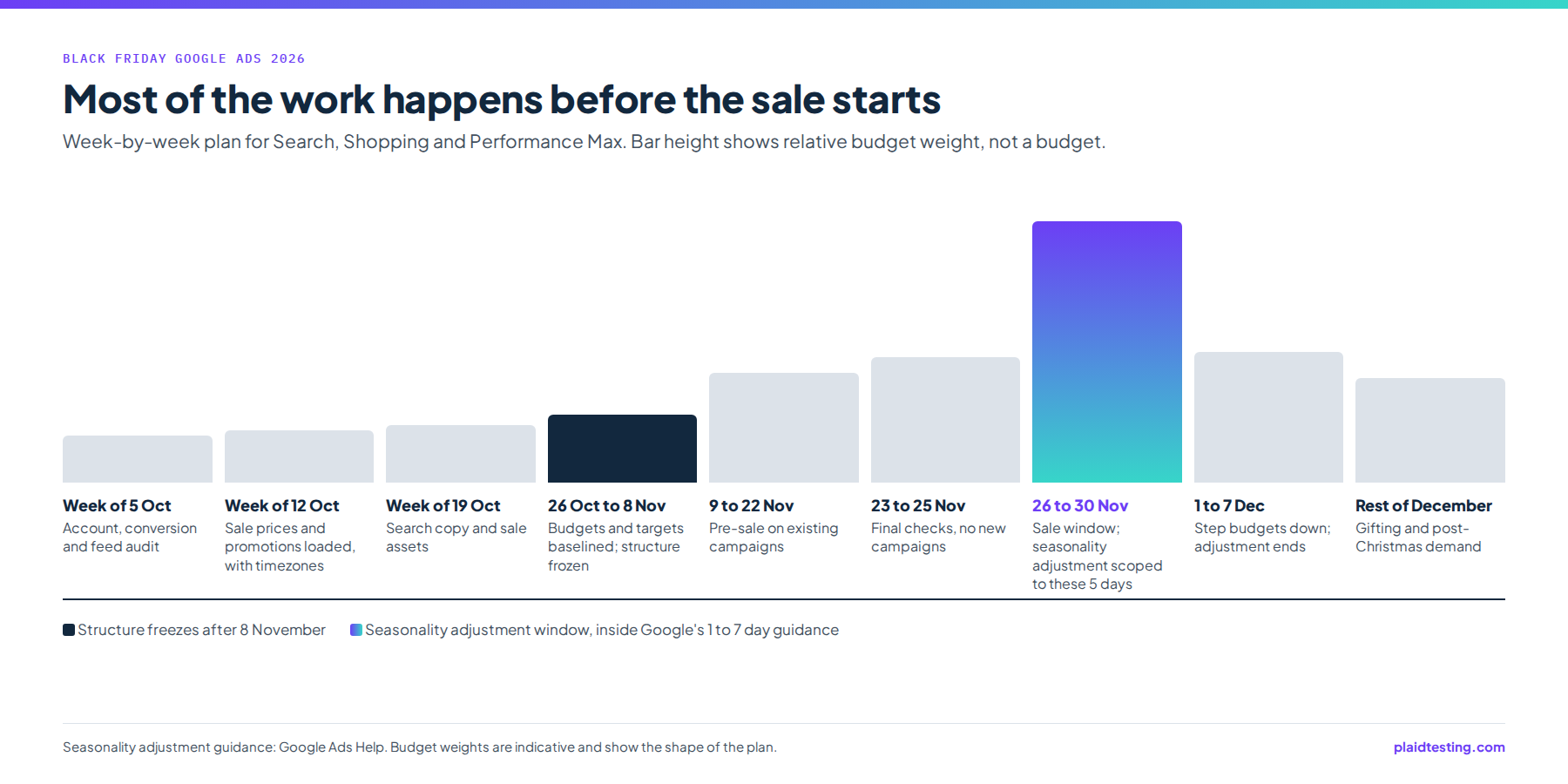
Two dates in that plan do most of the protecting. Structural changes stop after 8 November, because a campaign rebuilt in late November has no normal-week history to be judged against and no time to build one. And the seasonality adjustment covers only the five sale days, for reasons Google gives in its own guidance, set out in the next section.
The October weeks carry more weight than they look. The audit in the week of 5 October is where you learn whether purchases are recorded once per order with the right value, which bid strategy each campaign runs on, and which products Merchant Center has flagged. The week of 12 October gives feed changes time to process and be corrected before offers lock on Friday 30 October, and it gives any regular price you settle the history it needs before the sale, which matters for the annotation rules further down. The pre-sale from 9 to 22 November then runs on campaigns that already exist, so its results can be read against October’s.
If you also run paid social, drive both channels from the same dates. Our BFCM 2026 paid media calendar gives the cross-channel view, Meta Ads for Black Friday: Structure and Budget Pacing covers the Meta side, and our Black Friday checklist for ecommerce brands covers the stock, checkout and service work that sits around the media.
Should you use seasonality adjustments for Black Friday?
Yes, if your conversion rate jumps sharply during the sale, and only for the sale days. A seasonality adjustment tells Smart Bidding to expect a conversion rate change during a future event such as a promotion or sale. Google Ads Help describes adjustments as ideal for short events of 1 to 7 days and warns they may not work as well over extended periods of more than 14 days. The five days from 26 to 30 November sit inside the ideal range. The whole of November does not.
Google is just as clear that this is not a routine setting. It advises using adjustments only for major expected changes in conversion rate, because Smart Bidding already manages seasonal events on its own (Google Ads Help). If your conversion rate barely moved during Cyber Week 2025, perhaps because you discount lightly or not at all, leave the setting off and let bidding respond to what it sees.
Size the adjustment from your own data. Google’s worked example is that if you expect conversion rates to rise by 50% during a 3-day sale, you add up to a +50% conversion rate adjustment (Google Ads Help). The words “up to” matter. Pull your conversion rate for the 2025 sale days and for a normal period before them, divide the first by the second and subtract one: a sale-day rate 1.5 times the normal rate is the +50% in Google’s example. Treat your result as a ceiling. If the 2026 offer is shallower than the 2025 one, or the traffic mix has changed, set the adjustment below it.
Check eligibility during the October audit, not on 25 November. Adjustments are available for Search, Shopping and Display campaigns using Target ROAS or Target CPA, and for Performance Max under all bid strategies (Google Ads Help). Make sure every campaign you want covered runs on one of those strategies well before the sale.
The costly mistakes are simple ones. An adjustment stretched across all of November tells bidding to expect sale-day conversion rates on days that will not deliver them. One sized from hope rather than from 2025 data overbids the peak. One left running into December keeps bidding as if the sale were still on. Set the start and end dates to 26 and 30 November when you create it, and check on 1 December that nothing is still applying.
Want bid strategies and conversion values reviewed before you commit to an adjustment? That review is part of how our paid media team prepares Google accounts for Cyber Week.
How should Shopping and Performance Max handle sale prices?
Through Merchant Center, with the dates and the timezone written out. Retailers promote products from a Merchant Center feed whether they use Performance Max or Shopping campaigns (Google Ads Help), so a sale price has to be right in the feed before it can be right in either. Performance Max does not need its own Black Friday campaign to show the sale, because the price reaches it through the feed.
Start with the price rules. Merchant Center wants the sale price below the regular price, both prices visible on the landing page and only the sale price at checkout (Google Merchant Center Help). If your store applies the discount only in the cart, the product page will not match what the feed says, so fix the theme or the discount method in October rather than on the day.
Then the timezone, which is the easiest setting here to get wrong. The sale_price_effective_date attribute sets how long a sale price shows. Given dates without a time, it runs from 12 AM on the start date to 11:59 PM on the end date, and given no timezone it uses UTC (Google Merchant Center Help). US clocks go back on 1 November 2026, so in late November Eastern time is five hours behind UTC and Pacific time is eight. A range entered as 27 to 30 November with no time or timezone therefore starts showing sale prices at 7 PM Eastern (4 PM Pacific) on Thanksgiving and stops at 6:59 PM Eastern (3:59 PM Pacific) on Cyber Monday, hours before a sale that ends at midnight Eastern. Write a time and your UTC offset into both ends of the range.
Next, protect the sale price annotation. Annotations need a discount greater than 5% and less than 90%, and for US Shopping ads the base price must have been charged for 5 days within the past 30 days, or 15 days within the past 200 days (Google Merchant Center Help). The working rule is to settle regular prices well before the sale and leave them alone. A regular price changed in the days just before 27 November may lack the history to qualify. A price raised only so it can be cut again also runs into the FTC’s pricing guides, under which a former price supports a comparison only when the item was genuinely and routinely offered to the public at it for a reasonably substantial period (FTC Guides Against Deceptive Pricing, 16 CFR 233.1).
Promotions have their own floor. In the US, Merchant promotions may not offer less than 5% off or $5 off, are limited to 6 months (183 days), and may not require a paid membership to redeem (Google Merchant Center Help). A members-only price for a paid loyalty tier therefore belongs in email, not in a Merchant promotion. Load promotions in the week of 12 October with their start dates set forward, so anything that falls short of the rules can be corrected with weeks to spare.
What should Search campaigns change for the sale?
The ads and the landing pages, not the keywords or the structure. Responsive search ads take up to 15 headlines and 4 descriptions, with a minimum of 3 headlines and 2 descriptions; headlines can be up to 30 characters, descriptions up to 90 and paths up to 15 (Google Ads Help). Thirty characters is tight enough that every sale headline has to do one job: name the offer, name the deadline, or name the product.
Write the sale assets in the week of 19 October. A useful set has several headlines that state the offer plainly, a few that say when it ends, and descriptions that carry the terms, such as exclusions and the final day. Google Ads Help says pinning is not recommended for most advertisers (Google Ads Help), so instead of pinning the offer to the first position, write enough offer-led headlines that most combinations carry it. Check every line against the limits in October, not during the sale.
Put the sale assets into the ads you already run rather than launching new campaigns. The keywords that convert in November tend to be the ones that converted in October, and a new campaign starts without the history your existing ones have built. The same logic applies to landing pages: if an ad promises the sale, the page it opens should show the sale price next to the regular price, matching what the feed tells Shopping.
Branded search needs its own line in the plan. Shoppers who already know you search for your name during the sale, and that demand is the easiest in the account to capture and the easiest to over-credit. Keep branded campaigns funded so they never run dry, and report them separately. A high branded ROAS on Black Friday mostly measures demand that existed before the ad, which is why it should not set the budget for everything else. If you are still deciding who should run the feed and Shopping side at all, Google Shopping Agency: What to Expect and Pay covers the work and its cost.
How should budgets and bids move across Cyber Week?
Budgets move; targets mostly stay put. Settle bid targets on normal-week data between 26 October and 8 November, then leave them. During the sale, the seasonality adjustment is the instrument that tells bidding conversion rates are about to rise. Loosening the ROAS target on the same days stacks a second change on the same expectation, and afterward you will not know which one produced the result.
Budgets are different, because a campaign that runs out early on Black Friday stops showing for the rest of the day, whatever the bid strategy would have done. Raise caps in planned steps from the start of the pre-sale on 9 November, set a ceiling for each sale day in advance, and agree who may go above it. The days should not be funded equally. Adobe measured $6.4 billion of US online spend on Thanksgiving Day 2025, $11.8 billion on Black Friday and $14.25 billion on Cyber Monday (Adobe, 2 December 2025), so Cyber Monday needs budget held back for it rather than whatever is left over.
What the budget steers toward matters as much as its size. At a heritage fashion brand we work with, new-customer revenue rose from $879,650 in Q1 2025 to $6,060,308 in Q1 2026, per its Triple Whale account. New customers are the number we steer Cyber Week bidding toward, not revenue that branded search would have captured anyway. That figure is a first-quarter result across all channels, not a Google Ads or Black Friday result, so it explains the goal rather than forecasting anything about November.
In practice, that means reporting each sale day on new-customer revenue and cost per new customer alongside platform ROAS, keeping branded search out of the headline number, and funding non-branded Search, Shopping and Performance Max on what they add rather than what they claim. Our paid media service sets Cyber Week budgets this way for Google and Meta together, so neither platform’s own report decides the split.
What happens after Cyber Monday?
Demand falls after Cyber Monday but does not stop, so the account should come down in steps rather than in one move. Between 1 and 7 December, lower budgets gradually toward the baseline, confirm the seasonality adjustment has ended, and make sure sale prices leave the feed at the moment they leave the site. A feed still showing a sale price after the site has reverted sends shoppers to a page that no longer matches the ad, which breaks the price rules you set up in October.
The copy shifts too, from discount to gifting and delivery confidence: shipping cut-off dates, gift cards and the returns policy. Swap in the regular headlines, or gifting versions written in October, before the sale assets start promising an offer that has ended.
Then treat the rest of December as its own period. Think with Google, citing Ipsos, reported that “Shoppers report their holiday spending peaks after December 25” (Think with Google, 14 November 2025). That argues for keeping budget available for the days after Christmas, rather than treating 30 November as the end of the season and spending December’s money in November.
Finally, write down what happened while the detail is fresh: the conversion rate on each sale day against the baseline, how the adjustment compared with reality, what a new customer cost on each day, and which products sold out and when. That record turns the 2027 adjustment into a measured number rather than a guess, and it is the most useful thing the week leaves behind.
If you want your Merchant Center, bidding and budget setup checked against this plan before structure freezes on 8 November, book a free 30 minute growth audit for your Google account and leave with three fixes you can make in October.
Common questions
Should I increase my Google Ads budget for Black Friday?
Usually, yes, in steps, and only as far as your margin can pay for the extra orders. Lift caps from the pre-sale onward so no campaign is cut off on a peak day, and fix a ceiling for each sale day ahead of time. Judge the increase on new-customer revenue and contribution after the discount rather than on platform ROAS alone, since sale-week ROAS often includes orders that would have arrived without the ads.
Should I apply a seasonality adjustment to the whole of Cyber Week?
Cyber Week in 2026 runs five days, Thursday 26 to Monday 30 November, which falls inside the 1 to 7 day range that Google Ads Help calls ideal, so treat it as the outer limit. Go no wider. Size the adjustment from how much your own conversion rate rose over those days in 2025, and if it hardly moved, skip the adjustment and let Smart Bidding handle the week.
Do I need a separate Black Friday campaign?
In the accounts we run, rarely. The sale reaches Shopping and Performance Max through sale prices and promotions in Merchant Center, and it reaches Search through new headlines and descriptions inside existing ads. A brand-new campaign arrives with no history in the one week where history counts most. The exception is a product set that exists only for the sale, and even that should be built by Friday 6 November, ahead of the structure freeze.
Do cost per click rates rise on Black Friday?
There is no reliable public figure for Black Friday cost per click that would describe your account, and we would not plan from one. Pull your own 2025 cost per click and conversion rate by day for Search and Shopping, compare the sale days with the weeks before, and budget from that. Watch the same numbers in your own auction data each day of Cyber Week, and judge cost per click against conversion rate rather than on its own.
Related reading
- BFCM 2026 Paid Media Calendar for Ecommerce Brands: the cross-channel calendar this Google plan fits inside
- Meta Ads for Black Friday: Structure and Budget Pacing: the same pacing logic applied to Meta
- Google Shopping Agency: What to Expect and Pay: who should run the feed and Shopping work, and what it costs
- Black Friday Checklist for Ecommerce Brands (2026): the stock, checkout and service checks around the media plan
- Demand Gen vs Performance Max: Which Should an Ecommerce Brand Run?