
Google Ads for Shopify runs through the free Google & YouTube app, which syncs products to Merchant Center, installs Google tags and can build Performance Max campaigns. At $50K+ a month that is the plumbing, not the plan: you still own the feed, the conversion settings, brand exclusions and the judgment of whether Google found new customers.
The app is published by Google LLC, listed since 28 November 2017 and rated 4.5 from more than 5,500 ratings (Shopify App Store). It cannot decide what the account optimizes toward, which products deserve budget, or how much of the revenue Google reports would have arrived anyway.
What does the free Google & YouTube app set up for a Shopify store?
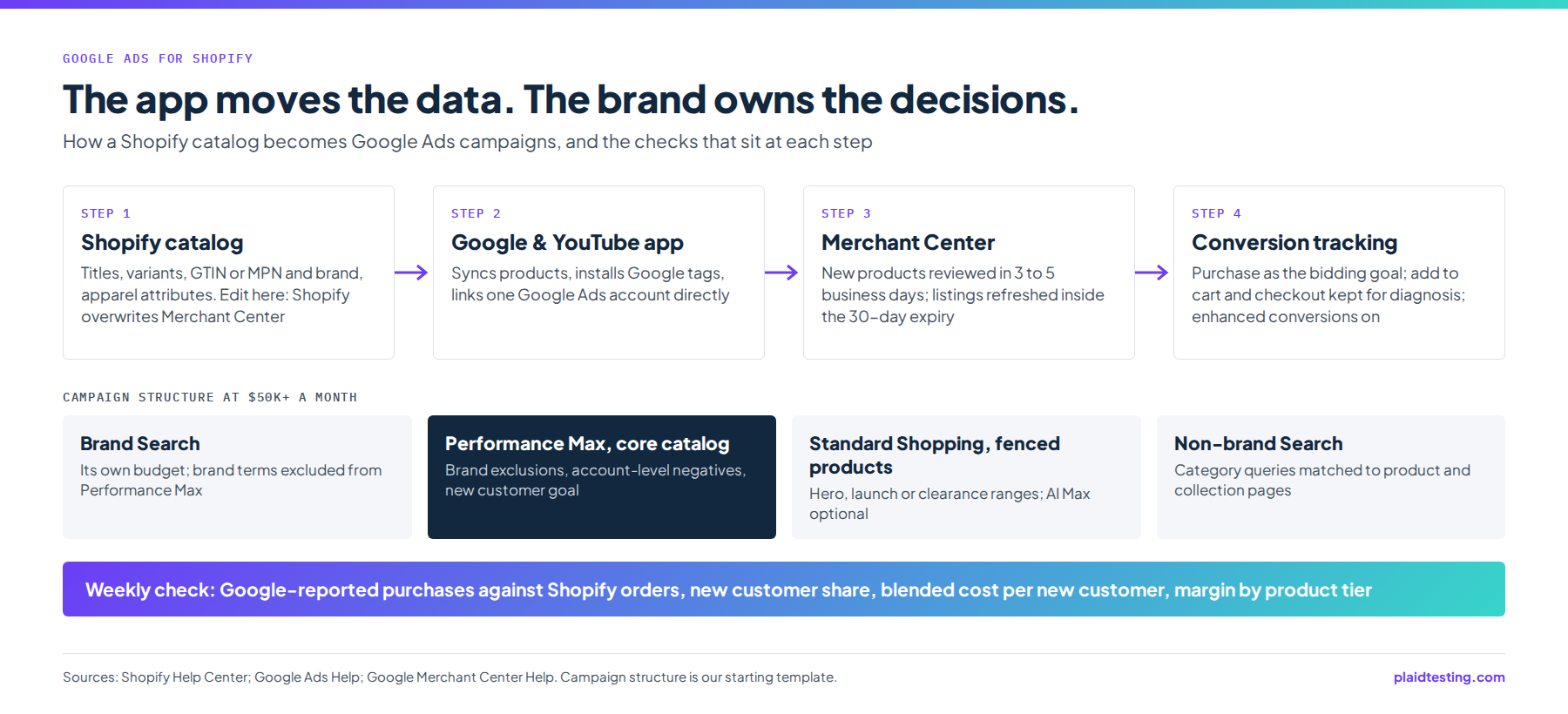
It handles three jobs: product sync, measurement and campaign creation. The channel “automatically syncs your products and relevant information about your Shopify store with the Google Merchant Center” (Shopify Help Center), and that covers every product available to the online store (Shopify Help Center). For eligible US stores, synced products “can display in relevant Google Shopping tab search listings for free”, so a clean catalog earns unpaid visibility before any media budget is set.
Connecting the app installs Google tags for each connected service and suggests purchase, add to cart and checkout started as default conversion actions, set as the account default (Google Ads Help). Creating a campaign through the app adds conversion actions and sets up conversion tracking automatically (Google Merchant Center Help).
Two limits matter more than any feature. The app “only supports directly linking a single Google Ads account”, and any other account, including one reached through a manager account, has to be set up by hand (Google Ads Help). And “The Google & YouTube sales channel is managed by Google” (Shopify Help Center), so feed and campaign problems are settled with Google rather than with Shopify. For a brand running separate ad accounts by region or by label, those manual setups are where we most often find a second purchase tag counting the same orders.
| Area | What the app handles | What you still own |
|---|---|---|
| Product sync | Sends every product available to the online store and refreshes listings inside Google’s 30-day expiry window | Product data quality at the source, because Shopify’s version overwrites Merchant Center |
| Product review | Submits new products, which Google reviews within 3 to 5 business days of the first sync | A launch calendar that leaves room for review before ads go live |
| Feed attributes | Passes the identifiers and variant options that exist in Shopify | GTIN, or MPN and brand; English option names; age group, gender, color and size on apparel |
| Store eligibility | Enables free Shopping tab listings for eligible US stores | No password page, a payment provider, refund policy, terms of service and a visible contact method |
| Conversion actions | Suggests purchase, add to cart and checkout started and sets them as the account default | Choosing which action bidding optimizes toward, and removing duplicate purchase actions |
| Enhanced conversions | Offers to switch it on at connection or later | Switching it on, and collecting consent where it is legally required |
| Account linking | Links one Google Ads account directly | Manual tagging for any other account, including one under a manager account |
| Campaign creation | Builds Performance Max campaigns and the tracking they need | Brand and non-brand split, brand exclusions, negative keywords and margin tiers |
| Reporting | Shows Google’s own conversion figures | Reconciling them with Shopify orders, new customer counts and margin |
Sources for the table: Shopify Help Center for the sync, review times and store requirements; Google Ads Help for conversion actions, enhanced conversions, consent and account linking; Google Merchant Center Help for campaign creation and the overwrite rule.
What does Merchant Center need from a Shopify catalog?
The store has to qualify first (Shopify Help Center): no private, password-protected mode, a valid payment provider, a refund policy, terms of service and at least one visible contact method. Merchant Center has to sit on a verified domain that is not associated with another account, and the channel cannot sync products to a multi-client Merchant Center account, which matters if a previous manager created yours that way.
The product rules bite hardest in apparel. Products with a GTIN need it added, and products without one need an MPN and brand. Product options, including variants, must be in English, and apparel needs age group, gender, color and size attributes reviewed (Shopify Help Center). A label that never registered barcodes works from MPN and brand, so keep those values, and option names, consistent across every variant.
One rule decides where feed work happens: “The information from your Shopify account will always overwrite the information in your Merchant Center account” (Google Merchant Center Help), with ad campaigns the only exception. A title rewritten by hand in Merchant Center will not survive the next sync, so title and attribute changes belong in Shopify, or in a dedicated feed tool once the catalog outgrows Shopify’s product fields. We order titles the way shoppers phrase a search: what the item is, the attribute that sets it apart, then color, with the brand name first only where people search for it. Our guide to Google Shopping feed work and its costs goes further.
Timing and ownership complete the picture. Google reviews new products within 3 to 5 business days after the first sync, and under Google’s “strict 30-day expiry policy” the channel refreshes products inside that window on its own (Shopify Help Center). Launch products should therefore reach Merchant Center several business days before the ads that depend on them. On ownership, “You can’t change the Merchant Center account after the campaign is created” (Google Ads Help). Moving to another Merchant Center later means rebuilding Shopping and Performance Max campaigns without their history, so confirm the account is yours, on your verified domain, before the first campaign is built.
How should Shopify Google Ads conversion tracking be set up?
Decide what bidding should chase, then make sure each order counts once. Purchase, add to cart and checkout started all arrive as account-default actions (Google Ads Help), which lets Smart Bidding treat a cart addition as a result. In the accounts we run, purchase is the only action bidding optimizes toward. The other two stay in the account for diagnosis, so a drop in checkouts still shows up, without inflating the count the system learns from.
Next, look for duplicates. Because a campaign created through the app adds its own conversion actions (Google Merchant Center Help), a store with an older purchase tag, a tag manager container or a second linked account can end up recording one order twice. The test is arithmetic. Over a full month, Google’s purchase conversions across all campaigns should sit below Shopify’s total orders, since each order is at most one purchase. If they do not, keep one purchase action counting, take the others out of your goals, and check that Google’s value per order matches Shopify’s.
Then switch on enhanced conversions, which “supplements your existing conversion tags by sending hashed first party conversion data from your website to Google in a privacy safe way” (Google Ads Help). Email, name, home address or phone number are hashed with SHA256 before they leave the site, and Google says the feature can improve the accuracy of conversion measurement (Google Ads Help). A Shopify checkout already collects those fields.
Consent sits alongside it, and the app guidance makes merchants responsible for getting it where legally required (Google Ads Help). Basic consent mode blocks tags until a visitor interacts with the banner and uses a general model; advanced mode sends cookieless pings when consent is denied and “provides an advertiser-specific model as opposed to a general model” (Google Ads Help). Whoever owns privacy at the brand makes that call, knowing the measurement trade-off.
Finally, remember what the conversion column is. Most conversion actions use data-driven attribution by default (Google Ads Help), and any model can only share credit among the Google interactions Google sees. Our tracking and attribution work builds the store-side view that Google’s numbers are checked against: orders, new customers and margin, read from Shopify and Triple Whale.
If your conversion actions are still whatever the app created, a review of them, and of the feed behind your Shopping ads, is where our Google Ads management for Shopify brands begins.
How should Google Ads for Shopify be structured at $50K+ a month?
Structure has one job at this spend: keep demand the brand already owns apart from demand Google finds, so each is funded on its own economics. A single Performance Max campaign over the whole catalog mixes the two. Performance Max reaches across Google’s inventory, from Search and Maps to YouTube and Gmail (Google Merchant Center Help), and without guardrails nothing stops it serving on your own brand name.
Two controls fix most of that. Brand exclusions block “your brand name, common misspellings, and even related subsidiary brands”, and Google recommends them “if you manage brand traffic in a separate campaign” (Google Ads Help). In Performance Max they cover Search and Shopping ads, with an option to let Shopping keep serving on the excluded brand terms; if you allow it, report that revenue as brand, not as prospecting. Negative keywords are the second control. “Performance Max negative keywords are applicable to Search and Shopping inventory only”, and account-level negatives apply to all Search and Shopping inventory, Performance Max included (Google Ads Help). One account-level list of searches that never sell for the brand, such as pattern, job or wholesale queries for a fashion label, then covers every campaign.
Standard Shopping keeps a place for products that need a fence: a hero range, a launch, a clearance set. On 30 April 2026 Google said Shopping campaigns can upgrade to AI Max “in one click” while retaining “existing product targeting controls and bidding flexibility”, with the option to turn off final URL expansion, and added that “for cross-channel performance, Performance Max remains your go-to” (Google, 30 April 2026). In a 7 May 2026 update, Google said campaign total budgets had launched for Search, Shopping and Performance Max, and claimed from its own data that they cut manual budget adjustments by 66% on average (Google, 7 May 2026). Total budgets suit fixed windows such as a launch or a sale, and our Black Friday Google Ads playbook sets out the 2026 peak dates.
Targets should come from margin, not from whatever ROAS the account posted before. Google’s guidance is to “set a ROAS target based on what will yield the highest profit” and to “Use the new customer acquisition goal to maximize revenue while driving more new customers” (Google Ads Help). Starting in June 2026, the strategy called Maximize conversion value with a Target ROAS is renamed Target ROAS (Google Ads Help), so older guides will not match the interface. Google’s own data says advertisers moving from Standard Shopping to Performance Max saw “a 25% increase in conversion value, on average, at a similar ROAS” between October 2022 and March 2023 (Google Ads Help), a figure recorded in Google’s attribution rather than in anyone’s bank account. Where Demand Gen fits is covered in our comparison of Demand Gen and Performance Max.
| Campaign | Job | Settings that matter | Judge it on |
|---|---|---|---|
| Brand Search | Capture shoppers already typing the brand name | Its own campaign and budget; brand terms excluded from Performance Max | What the brand would lose without it, not its ROAS |
| Performance Max, core catalog | Find buyers for the full feed across Google | Brand exclusions on, account-level negatives, margin tiers, new customer acquisition goal | New customer share and blended cost per new customer |
| Standard Shopping, fenced products | Protect budget for hero, launch or clearance products | Product groups chosen by hand; AI Max optional, with final URL expansion off | Contribution margin on those products |
| Non-brand Search | Win category searches that a product or collection page answers | Tight themes, the shared negative list, landing pages matched to the query | Cost per new customer against the tier’s margin floor |
| Demand Gen or YouTube | Create demand with video before people search | Audiences from your customer lists, creative made for the format | Movement in blended new customers and brand search volume |
That table is the starting structure behind how we run Google Ads for ecommerce brands, and it changes once an account’s own data arrives rather than being defended against it.
What do Shopify Google Ads cost in 2026?
The broadest public benchmark for ecommerce brands is Triple Whale’s, built from more than 21,000 brands between 1 August 2025 and 31 July 2026 (Triple Whale, 20 August 2026). Brands in that sample put 22.50% of ad spend on Google, second only to Meta at 66.88%. At that share, a brand spending $50K a month on ads would put about $11,250 on Google (22.50% of $50K), a reference point rather than a recommendation. WordStream’s Search-only medians sit in separate columns below.
| Metric | Triple Whale, all industries (prior year) | Triple Whale, Apparel and Accessories | WordStream, Search campaigns only, all industries | WordStream, Search campaigns only, Apparel/Fashion and Jewelry |
|---|---|---|---|---|
| CPA | $28.14 ($25.59) | $25.40 | Not covered here | Not covered here |
| CPM | $15.35 ($13.54) | $12.13 | Not covered here | Not covered here |
| CPC | Not covered here | Not covered here | $5.42 | $4.44 |
| CTR | 1.65% (1.45%) | 1.67% | 6.64% | 6.64% |
| Conversion rate | 3.11% (higher a year earlier) | 2.78% | 8.18% | 4.50% |
| ROAS | 3.27 (3.39) | 3.99 | Not covered here | Not covered here |
| AOV | $87.65 ($84.03) | $99.39 | Not covered here | Not covered here |
The Triple Whale columns come from Triple Whale’s benchmark, updated 20 August 2026. The WordStream columns are medians from 13,474 US Search campaigns between April 2025 and March 2026, with Shopping and Performance Max excluded (WordStream, 19 May 2026).
The year-over-year movement says more than any single median. Across all industries, median CPA rose 9.96% to $28.14 while median AOV rose from $84.03 to $87.65, about 4.3% ($3.62 on $84.03), so cost per order grew more than twice as fast as order value, and median ROAS slipped from 3.39 to 3.27. Click-through rose from 1.45% to 1.65% while conversion rate fell to 3.11%: more clicks, fewer buyers. A brand holding the prior year’s ROAS target in that auction should expect fewer orders at the target, not the same orders more cheaply. The apparel and accessories medians look kinder, a 3.99 ROAS on a $99.39 AOV, yet CPM in the category still rose 13.38% to $12.13.
Two caveats keep those figures honest. Triple Whale does not state its ROAS attribution method or split results by campaign type, so its Google median blends brand search, Shopping and Performance Max. WordStream covers Search campaigns only, and its apparel, fashion and jewelry medians, a $4.44 CPC and a 4.50% conversion rate, imply about $98.67 per conversion ($4.44 divided by 0.045). That is nearly four times Triple Whale’s $25.40 apparel CPA. The samples differ, so this proves nothing precise, but it shows why a blended Google CPA should never be the target for non-brand Search. For the Meta half of the same Shopify plan, read Facebook ads for Shopify: setup, tracking and scale.
How do you tell whether Google is adding customers or claiming them?
Start with what Google’s report cannot see. It has no view of the Meta ad, creator video or email that came first, so a shopper who saw your Reels ad, then searched your brand name and clicked a Shopping ad, lands in Google’s column as a sale. Reporting helps more than it did: on 30 April 2025 Google announced channel-level reporting, full search terms reporting and more detailed asset reporting for Performance Max, a campaign type it says “is used by over one million advertisers” (Google, 30 April 2025). Read both every week. Search terms show how much Performance Max revenue sits on brand and near-brand queries, and the channel view shows spend drifting toward placements nobody planned.
Then reconcile against the store. We read four lines each week: Google-reported purchases against total Shopify orders, to catch double counting; the portion of orders Google claims that were first purchases, checked in Shopify or Triple Whale; blended cost per new customer across every channel; and contribution margin by product tier. If Google’s figures improve and the store’s do not, we explain the difference before any budget changes.
Scale gets judged the same way, on the blended ratio. At a heritage fashion brand we work with, revenue divided by blended ad spend rose from 2.86 in the first quarter of 2025 to 3.76 in the first quarter of 2026, while blended ad spend grew more than fivefold, per its Triple Whale account. The figure spans every channel the brand buys, with Google only one of them; no incrementality test separated any channel’s part, and merchandising and product choices shaped the result as well. What it sets is the standard for Google as its budget grows: the blended ratio has to hold or improve while total spend rises. A Google ROAS that climbs while the blended ratio falls means Google is collecting credit rather than adding customers.
The strongest check withholds spend. Pause non-brand Performance Max in a set of regions and compare new customer orders there with matched regions that kept running. Our guide to ecommerce attribution models and tools covers the wider options, and the whole process sits inside paid media management that budgets every channel from one plan, so Google earns its share against Meta and the rest on the same blended numbers.
Before Google’s budget goes up again, find out what share of its revenue is branded and whether each Shopify order is counted once. Book a free 30 minute growth audit of your Google and Shopify data and leave with the fixes to make first.
Common questions
Is the free Google & YouTube app enough to run Google Ads for a Shopify store?
For the connection, yes. It syncs the catalog to Merchant Center, installs Google tags and can create Performance Max campaigns. For a brand spending $50K+ a month it is not enough on its own. Someone still has to fix product attributes in Shopify, choose the conversion action bidding works toward, separate brand from non-brand demand, and judge the results on new customers instead of the revenue Google reports.
Can you connect more than one Google Ads account to a Shopify store?
Not directly through the app. According to Google Ads Help, it links a single Google Ads account; any other account, including one managed through a manager account, needs conversion tracking set up manually. If you go that route, confirm each account records a purchase once per order, and that the manual setup and the app are not both firing on the same checkout.
Why does Google Ads report more conversions than Shopify shows?
Usually for one of two reasons. Either the account has more than one purchase action counting the same order, which happens when the app’s tracking is added on top of an older tag, or Google is crediting orders that other channels also claim. The first is a setup fault to fix before anything else. The second is normal attribution behavior, which is why Google’s numbers need checking against Shopify orders and new customer counts.
How much of a Shopify ad budget should go to Google Ads?
There is no fixed share. Triple Whale’s 2026 benchmark, updated 20 August 2026, found brands put 22.50% of ad spend on Google. The right figure for your store rests on the search volume your category gets and on what portion of Google’s current revenue comes from brand searches. Fund non-brand campaigns on the cost of a new customer against your margin, and size brand spend to what you would lose without it.
Related reading
- Demand Gen vs Performance Max: Which Should an Ecommerce Brand Run?: when Demand Gen earns budget beside Performance Max
- Black Friday Google Ads: 2026 Playbook for Ecommerce: the October to December timeline for prices, budgets and bidding
- Ecommerce Attribution: Models, Tools and What to Trust: reconciling Google, Meta and Shopify numbers
- Facebook Ads for Shopify: Setup, Tracking and Scale: the Meta side of the same Shopify setup